


Search Website
Setting Up News and Adding News Articles
Setting up News on your site requires you to create a News Main Folder as well as a News Year Folder before you create news articles. Doing so will create the necessary index pages to display your articles on your homepage and new index pages and organize your news articles.
Begin by creating your main news folder:
- Click Add Content
- Click Global Assets
- Scroll down and click News Main Folder
- In the Title box, type News
- Choose options for Include in Top Navigation and Include in Left Hand Navigation
- Click Submit. This will create your main news folder and index page to display links to your news articles. (shown as news/index in your folder/page listing)
Now you can create your yearly news folder(s):
- Click Add Content
- Click Global Assets
- Scroll down and click News Year Folder
- Confirm that the Placement Folder is the main news folder you created above
- In the Title box, type 2026 (or whatever year you are creating)
- Click Submit
- Select Add Content then choose Global Assets > Content Page
- Choose Placement Folder to be the /news folder or year folder news/2025
- Under Page Layout - Choose News Article
- Expand News Article drop down to add required news article details
- Click ellipsis to Submit
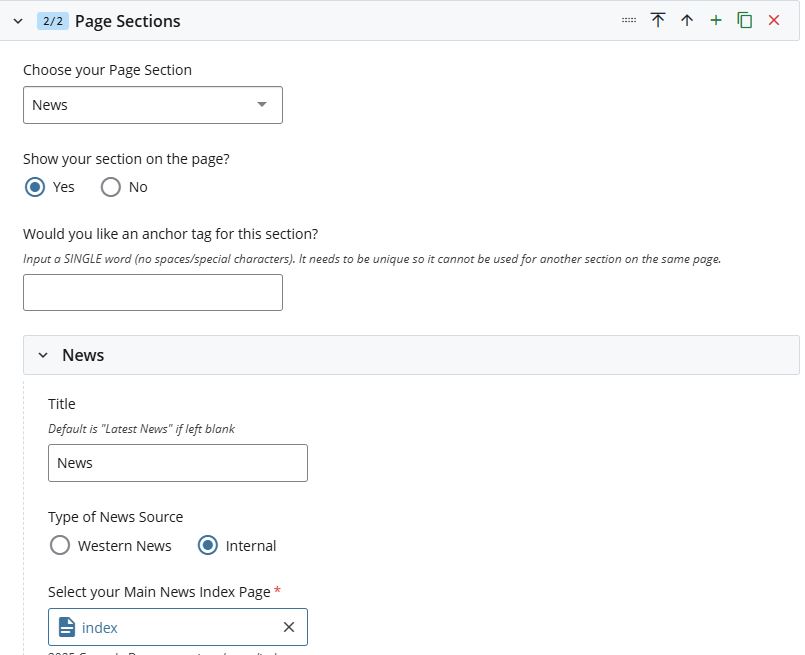
- Edit your index Homepage to add News section
- Fill in the required fields including the Title and your Main News Index Page (news/index)
- Click ellipsis to Submit