Setup Duo MFA
MFA setup is now integrated with Western Identity Activation for employee and actively enrolled students. There are some Western Identities that are not eligible or DUO licensing on activation e.g. student applicant, former student alumn. Prior to logging into a service that requires MFA, you are required to enroll.
Refer Add or Remove a DUO device for a Western Identity that is eligible for DUO licensing after activation. See details below for a guide that explain the enrollment options available.
Chose what authentication device(s) do you want to use to verify your identity?
This will be the device that the Duo notifications get sent to. You will need this device readily available to complete the next step. Western University considers it best practice to choose multiple authentication devices.
Supported Devices - click each device for more information from the Duo site.

If you don't have a strong preference WTS would recommend Duo app with push notification. The Duo Mobile App can downloaded from the Apple App Store for iOS 11 and newer and the Google Play Store for Android 7 and newer. Phones that are iOS 10 and older and/or Android 6 and older will not be compatible with the Duo Mobile App.
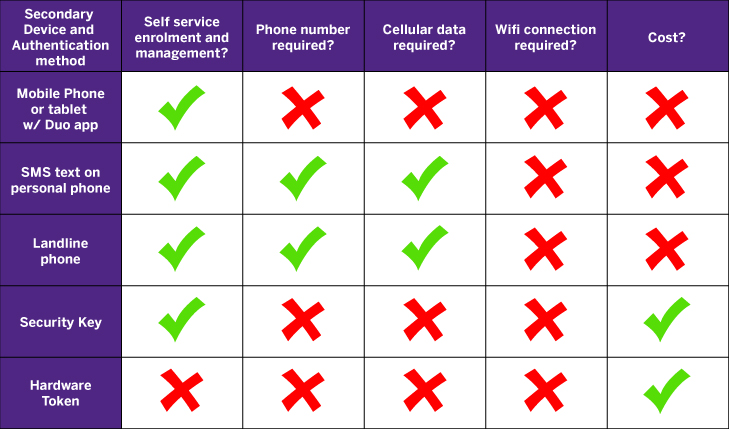
* a cost may apply to hardware tokens, please speak to the WTS Helpdesk for details.
Published on and maintained in Cascade.





